The Cost of Slow Internet Tickets
Customer Support Leaders at regional ISPs consistently deal with the same set of frustrations:
- “Slow internet” is the most common complaint your team receives, and the hardest to diagnose quickly
- Tickets that should take two minutes to resolve are consuming 10-15 minutes because agents are jumping between systems just to piece together what’s actually happening
- A significant portion of your truck rolls turn out to be in-home Wi-Fi problems that never required a dispatch
- Escalations to the NOC are frequent, disruptive, and often unnecessary, but your L1 agents don’t have the visibility to know that until it’s too late
- New hires take weeks to become effective because they need to learn multiple vendor tools before they can confidently troubleshoot anything
The cost adds up fast. Telecom support calls average $20–$25 per ticket in North America, and that’s before a truck roll enters the picture. Each field dispatch runs $150–$500 in direct costs, with the Technology Service Industry Association estimating the true all-in cost closer to $1,000 per dispatch once labor, travel, vehicle, and opportunity costs are factored in.
Also, according to field service research, 25% of truck rolls are non-value-added or avoidable entirely, i.e. dispatched not because a physical fix was needed, but because the support team didn’t have the data to diagnose the problem remotely.
This guide explains what “slow internet” tickets actually are, why they’re so difficult to resolve quickly, and what the best-run ISP support teams do to reduce their volume and cost.

What Is a Slow Internet Ticket?
A slow internet ticket is any subscriber-initiated support contact where the reported complaint is degraded, inconsistent, or unsatisfactory internet performance, regardless of whether the actual cause is on the ISP’s network.
This definition matters because the phrase “slow internet” is a symptom, not a diagnosis. It describes what the subscriber is experiencing without identifying where in the system the problem originates. The same complaint, “my internet feels slow,” can have four completely different root causes, each requiring a different resolution path.
The four root causes of slow internet complaints at regional ISPs:
| Root Cause | What's Happening | Scope | Truck Roll Needed? |
|---|---|---|---|
| AP or sector congestion | The access point serving the subscriber is overloaded, and all subscribers on that sector are affected | Multi-subscriber | No—escalate to NOC with supporting data |
| RF or CPE Radio degradation | The subscriber's wireless link is impaired due to interference, poor signal, or failing hardware | Single subscriber | Sometimes—depends on whether re-pointing or CPE replacement is needed |
| In-home Wi-Fi | The subscriber's router or in-home network is the bottleneck, whereas the ISP's network is performing normally | Single subscriber | Rarely—typically resolved with customer guidance or router upgrade |
| Individual device behavior | A specific device is misbehaving, running background updates, or saturating the connection | Single device | No |
The core challenge for support teams is that without real-time network data mapped to the subscriber’s specific topology, there is no fast way to tell these four cases apart. Agents default to generic troubleshooting scripts, spend 10-15 minutes reaching a diagnosis (if they reach one at all), and frequently escalate or dispatch when neither is necessary.
One consumer survey found that subscribers blamed their ISP for streaming slowdowns 36% of the time, but blamed their own Wi-Fi network almost as often, at 35.9%. This near-even split reflects a genuine diagnostic ambiguity that gets resolved the wrong way, at the ISP’s expense, when support teams lack the right visibility tools.

Why Slow-Internet Tickets Are So Expensive
Not all support tickets are created equal. Slow internet complaints are among the most expensive ticket types for regional ISPs for three compounding reasons.
They are high-volume. Slow internet is consistently the most common complaint category across fixed wireless and fiber ISPs. A support operation that hasn’t addressed the structural causes will find a large share of its total ticket volume locked in this one category.
They are difficult to diagnose remotely without QoE visibility. A support agent without access to real-time subscriber QoE data, AP health, and topology information cannot reliably distinguish an in-home problem from a network problem on the first call. This drives escalations and callbacks, both of which significantly multiply the cost per resolution.
They generate disproportionate truck rolls. When in-home issues are misattributed to the network—which happens frequently without the right tools—the result is a dispatch that confirms no network fault. Telecom operators estimate that 17–20% of all field dispatches are “no fault found” visits. Research from Aberdeen Group and ServiceMax puts the re-dispatch rate for unresolved first visits at 33%, with each requiring an average of 1.6 additional truck rolls to close at $200–$300 each. A single misdiagnosed slow internet call that results in a truck roll, a follow-up visit, and a NOC escalation that can easily cost more than a month of that subscriber’s revenue.
The benchmark cost picture for slow internet tickets:
| Cost Driver | Benchmark |
|---|---|
| Average telecom support ticket (North America) | $20-$25 per ticket |
| Average truck roll (direct costs) | $150-$500 per dispatch |
| Average truck roll (true all-in cost, per TSIA) | ~$1,000 per dispatch |
| Avoidable truck rolls industry-wide | ~25% of all dispatches |
| "No fault found" dispatches in telecom | 17-20% of visits |
| Re-dispatch rate for unresolved first visits | 33%, averaging 1.6 follow-up trips |
How ISP Support Teams Reduce Slow-Internet Tickets
Build a First-Call Triage Framework Mapped to Root Cause
The goal of a triage framework is to get every agent, including your newest L1 hires, to the correct root cause category within the first two minutes of a call. This doesn’t require deep technical expertise. It requires the right data in front of the agent at the right moment.
An effective triage sequence for slow internet calls:
Step 1: Look up the subscriber and assess current QoE indicators. Is latency elevated? Is the subscriber hitting their plan rate? Is the issue happening right now, or are they describing something historical?
Step 2: Check the scope. Are other subscribers on the same AP experiencing the same issue? If yes, the problem is on your network at the AP or sector level. Escalate to NOC with that data attached. If it’s isolated to one subscriber, continue.
Step 3: Assess the RF link (fixed wireless). Is the subscriber’s CPE radio performing normally? Are signal levels, link rate, and retransmission rates within expected ranges? Poor RF metrics point to a link issue that may require field intervention.
Step 4: Check in-home indicators. Is there a measurable gap between what the network is delivering to the CPE and what the subscriber’s devices are experiencing? A significant delta between those two measurements points to in-home Wi-Fi as the source, not the network.
Step 5: Look for individual device behavior. Is usage spiking from one specific device? Is one device consuming the subscriber’s full plan bandwidth while others are unaffected?
This five-step sequence, executed with real-time QoE data in a single interface, categorizes most slow internet complaints in under two minutes. It also gives your support team a confident, data-backed answer rather than a guess.
How Mascon Cut Support Call Times in Half
Give L1 Agents the Visibility to Resolve Without Escalating
The most direct lever on first call resolution rate (FCR) is giving L1 agents access to the data they need to make a confident diagnosis without switching systems. When an agent can see subscriber QoE metrics, AP health, RF performance, and in-home indicators in one unified view—without logging into multiple vendor portals—they can resolve the majority of slow internet tickets at L1.
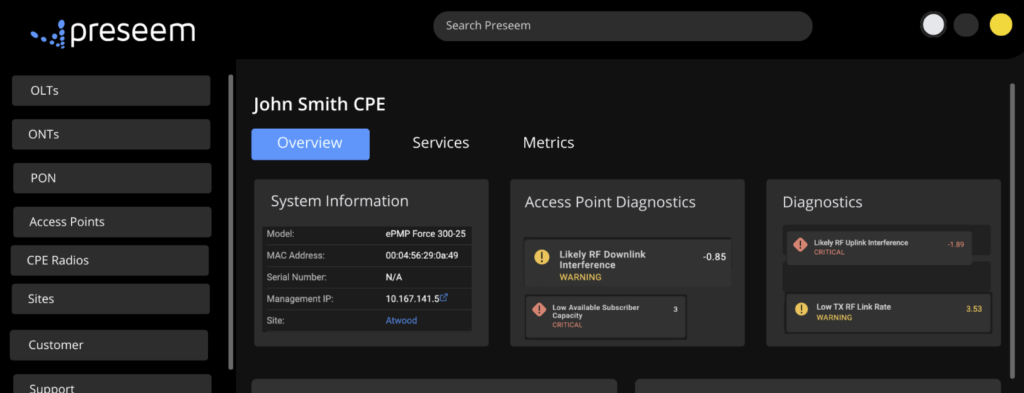
Preseem gives support agents a single, topology-aware view of every subscriber’s network experience. From the moment a subscriber is looked up, agents can see real-time and historical QoE metrics, plan enforcement status, RF link quality, and AP health, all in one interface, without touching a vendor portal. The interface is designed so that agents without deep RF expertise can still read the data confidently and reach the right diagnosis.
Eliminate Unnecessary Truck Rolls With Confirmed Pre-Dispatch Diagnosis
The standard for dispatching a truck roll should be a confirmed network-side issue that cannot be resolved remotely. That standard is only achievable when agents have the data to confirm it before dispatch, not after. A support operation with good QoE visibility should be able to answer, before every truck roll decision:
- Is the subscriber’s CPE receiving the signal it should be?
- Is the issue isolated to this subscriber, or affecting others on the same AP/ONT?
- Has the issue been present historically, or is it new?
- Is in-home Wi-Fi the likely cause?
When the last answer is yes, the correct resolution is a customer conversation, not a dispatch, with the potential for an upsell to a managed router or mesh solution. Identifying in-home Wi-Fi issues this way doesn’t just save on truck rolls; it creates a revenue opportunity!
Reduce Ticket Volume by Fixing Network Issues Before Subscribers Call
The most sustainable way to reduce slow internet tickets is to prevent the conditions that cause them. Support teams that only resolve tickets reactively will always be managing volume, not reducing it.
The highest-leverage proactive action is ensuring your Network Operations team has the visibility to find and fix congestion, poor RF conditions, and degrading infrastructure before subscribers experience them.
Every AP fixed before it begins generating complaints is a cluster of tickets that never gets opened, and a group of subscribers who never have a reason to question the quality of their service.
How Wood River Internet Catches Issues Before Their Customers Complain
The Business Case: What This Looks Like at Scale
Slow internet ticket volume is a leading indicator of churn risk and a direct driver of support costs. Every unresolved complaint is a subscriber one billing cycle away from canceling. Every avoidable truck roll is a direct cost with no revenue attached. Each unnecessary NOC escalation is time your most expensive technical staff spent on a ticket that shouldn’t have reached them.
The inverse is equally true. Support teams that resolve slow internet tickets quickly and accurately, with low truck roll rates and low escalation rates, generate measurably better satisfaction scores, lower churn, and lower cost-per-ticket.
The operational impact of QoE visibility on slow internet ticket handling:
| Metric | Without QoE Visibility | With QoE Visibility |
|---|---|---|
| Time to root cause identification | 10-15 minutes | Under 2 minutes |
| First call resolution rate | Low - frequent escalations and callbacks | High - most issues resolved at L1 |
| Truck roll rate | High - dispatched without confirmed diagnosis | Low - only dispatched for confirmed network issues |
| NOC escalation rate | High - L1 can't determine network vs. in-home | Low - L1 resolves, or escalates with supporting data |
| No-fault-found dispatches | 17-20% of visits | Significantly reduced |
| Support performance | Reactive, slow, inconsistent | Proactive, fast, data-backed |
Frequently Asked Questions
What is the most common cause of “slow internet” complaints at regional ISPs? The most common causes fall into four categories: AP or sector congestion affecting all subscribers on a shared access point, RF link degradation at the CPE radio, in-home Wi-Fi issues, and individual device behavior. In a significant portion of calls, the ISP’s network is performing normally and the issue originates in the subscriber’s home, making fast in-home vs. network attribution the single most valuable diagnostic capability a support team can have. Consumer research shows subscribers split almost evenly between blaming their ISP (36%) and their own Wi-Fi (35.9%) for streaming slowdowns, reflecting genuine diagnostic ambiguity.
How can L1 support agents diagnose network issues without deep technical knowledge? The key is giving L1 agents access to pre-interpreted QoE data, e.g. health scores, RF indicators, and per-subscriber metrics, rather than raw vendor data requiring expert analysis. When agents can see whether a subscriber’s experience is abnormal, whether the issue is isolated or shared with others on the same equipment, and whether in-home indicators are flagging, they can make a confident triage decision without needing to understand the underlying RF or networking mechanics in detail.
How do you prevent unnecessary truck rolls for slow internet complaints? Before any dispatch, agents should confirm three things: the issue is on the ISP’s network and not in-home, it cannot be resolved remotely, and a specific network element, e.g. CPE, AP, or backhaul, requires physical intervention. When agents have real-time QoE and topology data, this confirmation takes under two minutes. Without it, teams default to dispatching to find out, which is where the 17–20% no-fault-found rate in telecom comes from.
What’s the difference between a slow internet ticket caused by AP congestion vs. in-home Wi-Fi? AP congestion affects all subscribers connected to that access point simultaneously, and shows up as elevated latency and degraded QoE across multiple accounts at the same time. In-home Wi-Fi issues are isolated to one subscriber and show a measurable gap between what the ISP is delivering to the CPE and what devices inside the home are experiencing. The diagnostic distinction is critical: AP congestion requires a NOC escalation; in-home Wi-Fi typically requires a customer conversation or router upgrade recommendation.
What KPIs should Customer Support Leaders track to measure improvement in slow internet ticket handling? The most meaningful metrics are first call resolution rate (FCR), average handle time (AHT) specifically for slow internet ticket types, truck roll rate per 1,000 subscribers, NOC escalation rate, and no-fault-found dispatch rate. Tracking these together tells you whether your team is diagnosing faster, escalating less, dispatching more accurately, and whether overall volume is trending in the right direction. A reduction in no-fault-found dispatches is often the fastest-moving indicator when QoE visibility improves.
How does proactive network monitoring reduce slow internet ticket volume? When Network Operations teams have visibility into AP health, capacity scores, and degrading RF or fiber conditions, they can identify and fix problems before subscribers experience them. An AP that is proactively rebalanced or upgraded before it reaches congestion generates zero slow internet tickets for that event. The most effective support operations run on a shared data loop between network ops and support, where ticket patterns inform the NOC’s proactive prioritization, and proactive fixes shrink the ticket queue over time.